I am trying to understand StreamJsonRpc and running an example from here.
I have created a tone down example here. It contains server and client and communicates via StreamJsonRpc.
In the server, when I use Console.WriteLine, it throws exception. When I revert back to using await Console.Error.WriteLineAsync(), it runs fine.
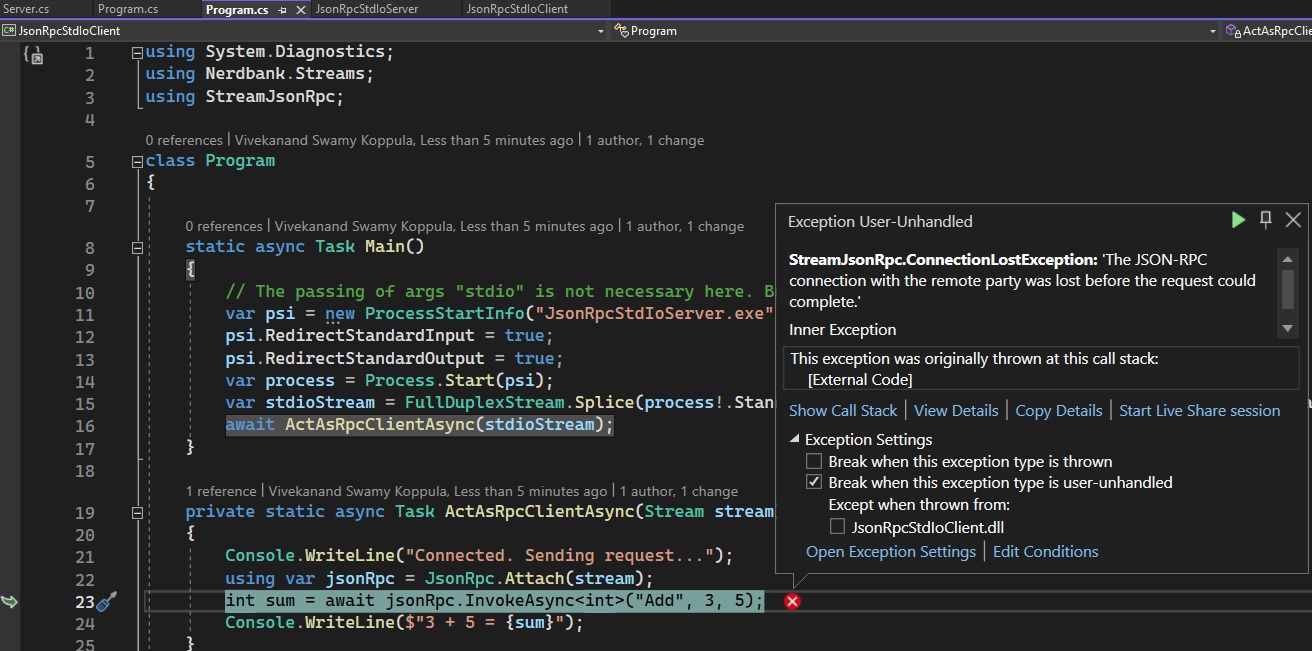
Why is that? Looks like there is something to do with await async that I am missing.
The following method works.
private static async Task RespondToRpcRequestsUsingConsoleErrorAsync(Stream stream, int clientId)
{
    await Console.Error.WriteLineAsync($"Connection request #{clientId} received. Spinning off an async Task to cater to requests.");
    var jsonRpc = JsonRpc.Attach(stream, new Server());
    await Console.Error.WriteLineAsync($"JSON-RPC listener attached to #{clientId}. Waiting for requests...");
    await jsonRpc.Completion;
    await Console.Error.WriteLineAsync($"Connection #{clientId} terminated.");
}
The following throws exception. You can see in the following Console.WriteLine() replacing await Console.Error.WriteLineAsync() above.
private static async Task RespondToRpcRequestsUsingConsoleAsync(Stream stream, int clientId)
{
    Console.WriteLine($"Connection request #{clientId} received. Spinning off an async Task to cater to requests.");
    var jsonRpc = JsonRpc.Attach(stream, new Server());
    Console.WriteLine($"JSON-RPC listener attached to #{clientId}. Waiting for requests...");
    await jsonRpc.Completion;
    Console.WriteLine($"Connection #{clientId} terminated.");
}
I tried using jsonRpc.Completion.Wait(); and jsonRpc.Completion.GetAwaiter().GetResult(); as follows, but no success.
private static void RespondToRpcRequestsUsingConsoleWithWait(Stream stream, int clientId)
{
    Console.WriteLine($"Connection request #{clientId} received. Spinning off an async Task to cater to requests.");
    var jsonRpc = JsonRpc.Attach(stream, new Server());
    Console.WriteLine($"JSON-RPC listener attached to #{clientId}. Waiting for requests...");
    jsonRpc.Completion.Wait(); // SEE HERE
    Console.WriteLine($"Connection #{clientId} terminated.");
}

private static void RespondToRpcRequestsUsingConsoleWithAwaiterAndResult(Stream stream, int clientId)
{
    Console.WriteLine($"Connection request #{clientId} received. Spinning off an async Task to cater to requests.");
    var jsonRpc = JsonRpc.Attach(stream, new Server());
    Console.WriteLine($"JSON-RPC listener attached to #{clientId}. Waiting for requests...");
    jsonRpc.Completion.GetAwaiter().GetResult(); // SEE HERE
    Console.WriteLine($"Connection #{clientId} terminated.");
}
How to run the example.
- Just open this in Visual Studio, set the client as start up project and press F5.
- With command line, cd into the client project and run it.
cd JsonRpcStdIoClient
dotnet run --project ./JsonRpcStdIoClient.csproj

This has nothing to do with
async. You are usingStandardInput/StandardOutputto communicate between processes,Console.WriteLinewrites toStandardOutput. So when you call it on the server it will send some random, at least from theJsonRpcstandpoint of view, data to the communication channel which it seems thatJsonRpccan't process, hence the result.Console.Erroron the other hand writes to standard error stream, so it does not affect the communication channel.As experiment remove all
Console.WriteLinein the server and for the client add monitoring of the duplex stream:Which results in something like