Description
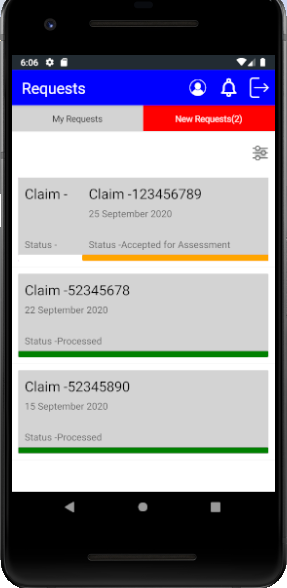
I used Swipe view inside Listview , in swipe view used frame as content and image in swipe right item view . When changed Itemsource dynamically and swipe right , the image is not shown instead another frame is created under this frame.
Steps to Reproduce
- create listview with Swipe view in Item templapte , frame as content of swipe view.
- Change item source dynamically.
- Swipe the item , image is not shown another frame is shown.
Expected Behavior
The image need to shown
Actual Behavior
Another frame is shown.
Basic Information
- Version with issue: 5.0.0.1558 - pre , 4.8.0.1687
- Last known good version: did not checked
- Platform Target Frameworks:
- iOS:
- Android: 10
- UWP:
- Android Support Library / AndroidX Version:
- NuGet Packages:
- Affected Devices: Emulator Pixel 2
Environment
About Microsoft Visual Studio > Copy Info [button] Visual Studio for Mac: Visual Studio > About Visual Studio > Show Details > Copy Information [button] 2. Paste into the code block below (between ```) -->Build Logs
Projects > Build - On Visual Studio for Windows: Tools > Options > Projects and Solutions > Build and Run On Visual Studio for Windows you also want to add `-v -v -v -v` to the mtouch additional arguments by right-clicking the project in the solution explorer and selecting `Properties`. -->Screenshots
Expected Behavior


Actual Behavior

Android Emulator - pixel_2_pie_9_0_-_api_28_5554 2020-12-08 18-02-18.zip