I am trying to create custom animated button I found this page: Buttons Example
I liked 3 & 19 on this website. I did try to make 3 but it is not the same. Can someone help me?
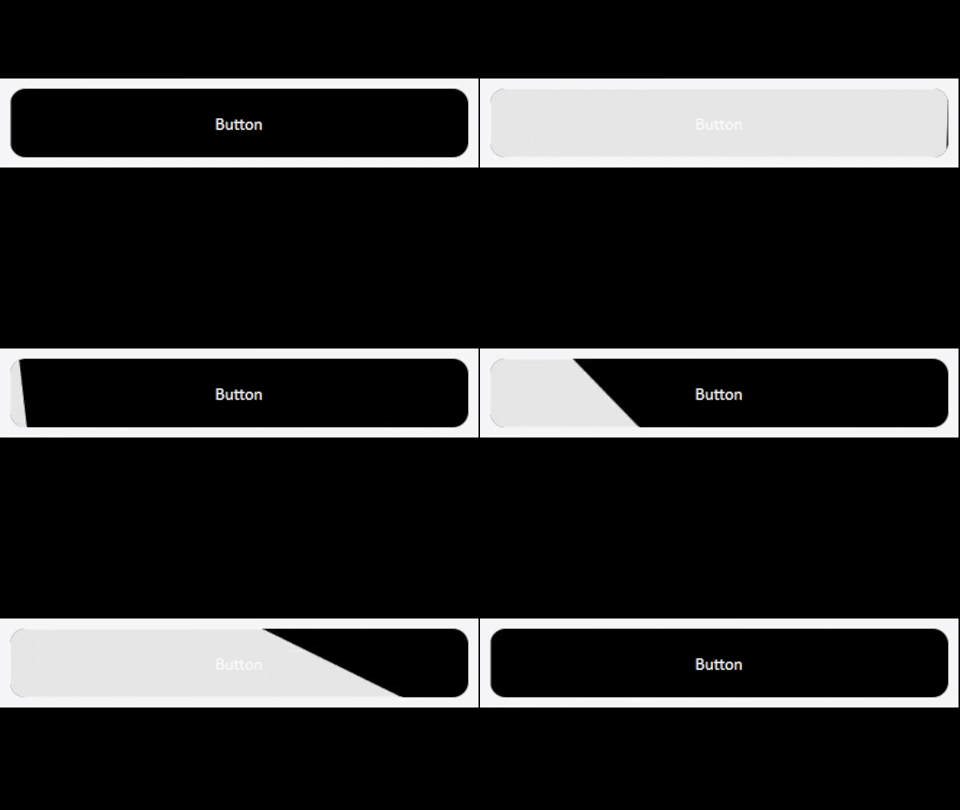
My Code for 3rd button on website:
 # -*- coding: utf-8 -*-
import sys, os, time, math
from PySide6 import QtCore, QtWidgets, QtGui
from PySide6.QtWidgets import *
from PySide6.QtCore import *
from PySide6.QtGui import *


class EButton3(QPushButton):
    AnimateEnabled = True
    Radius = 10

    _m_Text = ""
    def __init__(self, parent=None):
        super(EButton3, self).__init__(None)
        self.enterEvent = self.Custom_enterEvent
        self.leaveEvent = self.Custom_leaveEvent
        self.setText("Button")
    def getText(self):
        return self._m_Text
    def setText(self, Text):
        self._m_Text = Text
        self.update()

    _m_hover=False
    def isHover(self):
        return self._m_hover

    def paintEvent(self, event: QPaintEvent):
        ret = None #QPushButton.paintEvent(self, event)
        painter = QPainter(self)
        painter.setRenderHint(QPainter.Antialiasing)
        path, path2 = QPainterPath(), QPainterPath()
        BaseBackground, BaseBackgroundHover = QColor(Qt.black), QColor(22,2,22)
        BaseForeground, BaseForegroundHover = QColor(Qt.white), QColor(Qt.black)
        painter.setBrush(QBrush(BaseBackground if not self.isHover() else BaseBackgroundHover))
        painter.setPen(Qt.NoPen)

        rect = QRectF(0, 0, self.width(), self.height())
        path.addRoundedRect(rect, self.Radius, self.Radius)
        painter.drawPath(path)
        painter.setPen(BaseForeground if not self.isHover() else BaseForegroundHover)


        if self.AnimateEnabled:
            painter.setBrush(QBrush(QColor(231, 231, 231)))
            anval = self.AnimateVal / 100
            polygon = QPolygonF([
                QPoint(self.width() * anval, 0),
                QPoint(0, 0),
                QPoint(0, self.height()),
                QPoint((self.width() + 10) * math.sin(anval / 100 * 180), self.height())
            ])
            painter.setClipPath(path)
            path2.addPolygon(polygon)

            painter.drawPath(path2)

        painter.drawText(self.rect(), Qt.AlignCenter, self.getText())
        return ret

    _animateVal = 0
    def setAnimateVal(self, val):
        self._animateVal = val
    def getAnimateVal(self):
        return self._animateVal

    AnimateVal = QtCore.Property(int, getAnimateVal, setAnimateVal)
    temps = []

    def Custom_enterEvent(self, event) -> None:
        self._m_hover = True
        step2_ani = QPropertyAnimation(self, b'AnimateVal')
        step2_ani.setStartValue(self.getAnimateVal())
        step2_ani.setEndValue(100)
        step2_ani.setEasingCurve(QEasingCurve.InQuad)
        step2_ani.setDuration(500)
        self.temps.append(step2_ani)

        def valChanged():
            self.update()

        def finished():
            self.AnimateVal = 100

        step2_ani.valueChanged.connect(valChanged)
        step2_ani.finished.connect(finished)
        step2_ani.start()
        return QPushButton.enterEvent(self, event)

    def Custom_leaveEvent(self, event) -> None:
        self._m_hover = False
        step2_ani = QPropertyAnimation(self, b'AnimateVal')
        self.temps.append(step2_ani) # we need to store it or self.step_ani2 = ... else it will not start
        step2_ani.setStartValue(self.getAnimateVal())
        step2_ani.setEndValue(0)
        step2_ani.setEasingCurve(QEasingCurve.OutCubic)
        step2_ani.setDuration(500)

        def valChanged():
            self.update()

        def finished():
            self.AnimateVal = 0

        step2_ani.valueChanged.connect(valChanged)
        step2_ani.finished.connect(finished)
        step2_ani.start()
        return QPushButton.leaveEvent(self, event)


if __name__ == "__main__":
    app = QApplication(sys.argv)
    wind = QMainWindow()
    wind.setStyleSheet("QMainWindow{background-color:rgb(247,247,250)}")
    wind.resize(150, 80)
    wid = QWidget()
    lay = QHBoxLayout(wid)
    lay.setAlignment(Qt.AlignCenter)

    mycustombutton = EButton3()
    mycustombutton.setSizePolicy(QSizePolicy.Expanding, QSizePolicy.Expanding)
    lay.addWidget(mycustombutton)
    wind.setCentralWidget(wid)
    wind.show()
    sys.exit(app.exec())
My Code for 19th: button
# -*- coding: utf-8 -*-
import sys, os, time, math
from PySide6 import QtCore, QtWidgets, QtGui
from PySide6.QtWidgets import *
from PySide6.QtCore import *
from PySide6.QtGui import *


class EButton19(QPushButton):
    AnimateEnabled = True
    Radius = 10

    _m_Text = ""
    def __init__(self, parent=None):
        super(EButton19, self).__init__(None)
        self.enterEvent = self.Custom_enterEvent
        self.leaveEvent = self.Custom_leaveEvent
        self.setText("Button")
        self.propertyanimation = QPropertyAnimation(self, b'AnimateVal')
        self.propertyanimation.setDuration(350)

    def getText(self):
        return self._m_Text
    def setText(self, Text):
        self._m_Text = Text
        self.update()

    _m_hover=False
    def isHover(self):
        return self._m_hover

    def paintEvent(self, event: QPaintEvent):
        painter = QPainter(self)
        painter.setRenderHint(QPainter.Antialiasing)
        BaseBackground, BaseBackgroundHover = QColor(231,231,231), QColor(Qt.black)
        BaseForeground, BaseForegroundHover = QColor(Qt.black), QColor(Qt.white)
        path, path2 = QPainterPath(), QPainterPath()
        painter.setBrush(QBrush(BaseBackground if not self.isHover() else BaseBackgroundHover))
        painter.setPen(Qt.NoPen)

        rect = QRectF(0, 0, self.width(), self.height())
        anval = self.AnimateVal / 100
        padding = 10
        rect = rect.adjusted(-padding * anval, -padding * anval, padding * anval, padding * anval)
        path.addRoundedRect(rect.adjusted(padding / 2, padding, -padding / 2, -padding), self.Radius, self.Radius)

        painter.drawPath(path)


        if self.AnimateEnabled and self.isHover():
            painter.setBrush(QBrush(QColor(0, 0, 0)))

            painter.setClipPath(path)
            painter.setPen(Qt.black)
            radiusEffect = 75
            path2.addEllipse(self.rect().center(), radiusEffect * anval, radiusEffect * anval)

            painter.drawPath(path2)

        painter.setPen(BaseForeground if not self.isHover() else BaseForegroundHover)
        painter.drawText(self.rect(), Qt.AlignCenter, self.getText())

    _animateVal = 0
    def setAnimateVal(self, val):
        self._animateVal = val
    def getAnimateVal(self):
        return self._animateVal

    AnimateVal = QtCore.Property(int, getAnimateVal, setAnimateVal)

    def Custom_enterEvent(self, event):
        self._m_hover = True
        self.propertyanimation.stop()
        self.propertyanimation.setStartValue(self.getAnimateVal())
        self.propertyanimation.setEndValue(100)
        self.propertyanimation.setEasingCurve(QEasingCurve.InQuad)


        def valChanged():
            self.update()

        def finished():
            self.AnimateVal = 100

        self.propertyanimation.valueChanged.connect(valChanged)
        self.propertyanimation.finished.connect(finished)
        self.propertyanimation.start()
        return QPushButton.enterEvent(self, event)

    def Custom_leaveEvent(self, event) -> None:
        self._m_hover = False
        self.propertyanimation.stop()
        self.propertyanimation.setStartValue(self.getAnimateVal())
        self.propertyanimation.setEndValue(0)
        self.propertyanimation.setEasingCurve(QEasingCurve.OutCubic)

        def valChanged():
            self.update()

        def finished():
            self.AnimateVal = 0

        self.propertyanimation.valueChanged.connect(valChanged)
        self.propertyanimation.finished.connect(finished)
        self.propertyanimation.start()
        return QPushButton.leaveEvent(self, event)


if __name__ == "__main__":
    app = QApplication(sys.argv)
    wind = QMainWindow()
    wind.setStyleSheet("QMainWindow{background-color:rgb(247,247,250)}")
    wind.resize(150, 80)
    wid = QWidget()
    lay = QHBoxLayout(wid)
    lay.setAlignment(Qt.AlignCenter)

    mycustombutton = EButton19()
    mycustombutton.setSizePolicy(QSizePolicy.Expanding, QSizePolicy.Expanding)
    lay.addWidget(mycustombutton)
    wind.setCentralWidget(wid)
    wind.show()
    sys.exit(app.exec())
My code has big bad appearance (if you run it, you will see). I need help! (for 3rd & 19th button)
Thanks!

The main issue with your code is that you're clipping using a float based rectangle, but the painting is still happening in coordinates that are conceptually integers and also ignore the pen width.
You're also making your code more complex than it should, not considering the "overwriting" of enter/leave events that uses differently named methods instead of properly overriding the base implementation.
I would suggest a cleaner approach that, most importantly, considers the proper clipping coordinates, and also uses a single animation instead of continuously creating new ones (which could eventually lead to unnecessary memory usage, since those animations are not destroyed after they are finished.
The important part is that
setClipPath()uses theIntersectClipargument, so the clipping will only be set for the result of the merged paths (only using their common areas).Finally, it's not always necessary to create a custom property for Qt animations: a QVariantAnimation is normally quite sufficient (and efficient, unless you overuse them), since you only access it when needed, instead of calling the
Propertysetter.Before getting to the proposed solution, some other notes:
Note: the above implementation is not perfect yet (it has some issues with very wide and short buttons. I'll eventually update this answer as soon as possible, just consider the code as a conceptual reference.