I am trying to create some tables in my docx document. Everything works great when I open my document with OpenOffice Writer , unfortunately my tables width and some other properties are not respected in MsWord.
1)i create two table having same size and same cells but they are not aligned
Writer

Word

Code :
$table = $section->addTable();
$table->addRow(100);
$table->addCell(10000, array( 'borderBottomSize' => 1, 'borderBottomColor' => '000000'))->addText('DISAMINA', array('bold' => true), array('align' => 'center'));
$section->addTextBreak(2);
$table = $section->addTable();
$table->addRow(100);
$table->addCell(4000, array('borderRightSize' => 1, 'borderBottomSize' => 1, 'borderRightColor' => '000000'))->addText('Stato Reale del Rischio', array('bold' => true), array('align' => 'right'));
$htmlWriter::addHtml( $table->addCell(6000, array()),  "<div style='text-align: justify;line-height: 1.5;'>".$appr->relazione->stato_reale_rischio."</div>", false, false);

$table->addRow(100);
$table->addCell(4000, array('borderRightSize' => 1, 'borderBottomSize' => 1, 'borderRightColor' => '000000'))->addText('Dichiarazioni rese dall’Assicurato', array('bold' => true), array('align' => 'right'));
$htmlWriter::addHtml( $table->addCell(6000, array()),  "<div style='text-align: justify;line-height: 1.5;'>".$appr->relazione->dichiarazioni_rese."</div>", false, false);

$table->addRow(100);
$table->addCell(4000, array('borderRightSize' => 1, 'borderBottomSize' => 1, 'borderRightColor' => '000000'))->addText('Meccanica in cui si è svolto il sinistro', array('bold' => true), array('align' => 'right'));
$htmlWriter::addHtml( $table->addCell(6000, array()),  "<div style='text-align: justify;line-height: 1.5;'>".$appr->relazione->meccanica."</div>", false, false);

$table->addRow(100);
$table->addCell(4000, array('borderRightSize' => 1, 'borderBottomSize' => 1, 'borderRightColor' => '000000'))->addText('Caratteristiche mezzi di chiusura', array('bold' => true), array('align' => 'right'));
$htmlWriter::addHtml( $table->addCell(6000, array()),  "<div style='text-align: justify;line-height: 1.5;'>".$appr->relazione->caratteristiche_mezzi."</div>", false, false);

$table->addRow(100);
$table->addCell(4000, array('borderRightSize' => 1, 'borderBottomSize' => 1, 'borderRightColor' => '000000'))->addText('Operatività garanzia', array('bold' => true), array('align' => 'right'));
$htmlWriter::addHtml( $table->addCell(6000, array()),  "<div style='text-align: justify;line-height: 1.5;'>".$appr->relazione->op_garanzia."</div>", false, false);


$section->addTextBreak(2);
$table = $section->addTable();
$table->addRow(100);
$table->addCell(10000, array( 'borderBottomSize' => 1, 'borderBottomColor' => '000000'))->addText('DOCUMENTI ESAMINATI', array('bold' => true), array('align' => 'center'));

$table = $section->addTable();
$table->addRow(100);

$htmlWriter::addHtml( $table->addCell(4000, array('borderRightSize' => 1, 'borderRightColor' => '000000')), '', false, false);
$htmlWriter::addHtml( $table->addCell(6000, array()), "<div style='text-align: justify;line-height: 1.5;'>".$appr->relazione->documenti_esaminati."</div>", false, false);
$section->addTextBreak(2);

$section->addPageBreak();
2)I create contents which are not same in MsWord and width is not respected
Writer Three
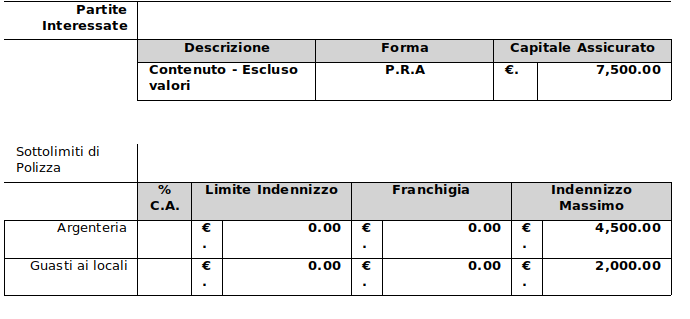
msWord

$table = $section->addTable();

$table->addRow(100);
$table->addCell(2000, array('borderRightSize' => 1, 'borderBottomSize' => 1, 'borderRightColor' => '000000'))->addText('Partite Interessate',  array('size' => 10, 'bold'=>true),array('align' => 'right'));
$table->addCell(8000, array())->addText('', $regularFont);

$table->addRow(100);

$table->addCell(2000, array())->addText('',  array('size' => 10, 'bold' => true), array('align' => 'center'));
$table->addCell(2666, array('borderSize' => 1, 'borderColor' => '000000','bgColor'=>'D3D3D3'))->addText('Descrizione',  array('size' => 10, 'bold' => true), array('align' => 'center'));
$table->addCell(2666, array('borderSize' => 1, 'borderColor' => '000000','bgColor'=>'D3D3D3'))->addText('Forma',  array('size' => 10, 'bold' => true), array('align' => 'center'));
$table->addCell(2666, array('borderSize' => 1, 'borderColor' => '000000','bgColor'=>'D3D3D3','gridSpan' => 2))->addText('Capitale Assicurato',  array('size' => 10, 'bold' => true), array('align' => 'center'));

foreach($appr->partiteInteressate as $partita){


$table->addRow(100);
$table->addCell(2000, array())->addText('',  array('size' => 10, 'bold' => true));

$table->addCell(2666, array('borderSize' => 1, 'borderColor' => '000000'))->addText($partita->descrizione,  array('size' => 10, 'bold' => true) ,array('align' => 'left'));
$table->addCell(2666, array('borderSize' => 1, 'borderColor' => '000000'))->addText($partita->forma,  array('size' => 10, 'bold' => true),array('align' => 'center'));
$table->addCell(666, array('borderSize' => 1, 'borderColor' => '000000'))->addText("€.", array('size' => 10, 'bold' => true) ,array('align' => 'left'));
$table->addCell(2000, array('borderSize' => 1, 'borderColor' => '000000'))->addText(number_format($partita->capitale_assicurato ,2, '.', ',') ,  array('size' => 10, 'bold' => true) , array('align' => 'right'));
}

$section->addTextBreak(2);

$table = $section->addTable();

$table->addRow(100);
$table->addCell(2000, array('borderRightSize' => 1, 'borderBottomSize' => 1))->addText('Sottolimiti di Polizza',  array('size' => 10), array('align' => 'left'));
$table->addCell(8000, array())->addText('', $regularFont);

$table->addRow(100);
$table->addCell(2000, array())->addText('', $header, array('align' => 'center'));
$table->addCell(800, array('borderSize' => 1, 'borderColor' => '000000','bgColor'=>'D3D3D3'))->addText('% C.A.',  array('size' => 10, 'bold' => true), array('align' => 'center'));
$table->addCell(2400, array('borderSize' => 1, 'borderColor' => '000000','bgColor'=>'D3D3D3','gridSpan' => 2))->addText('Limite Indennizzo',  array('size' => 10, 'bold' => true), array('align' => 'center'));
$table->addCell(2400, array('borderSize' => 1, 'borderColor' => '000000','bgColor'=>'D3D3D3','gridSpan' => 2))->addText('Franchigia',  array('size' => 10, 'bold' => true), array('align' => 'center'));
$table->addCell(2400, array('borderSize' => 1, 'borderColor' => '000000','bgColor'=>'D3D3D3','gridSpan' => 2))->addText('Indennizzo Massimo',  array('size' => 10, 'bold' => true), array('align' => 'center'));

foreach($appr->garanzieAttivate as $g){


$table->addRow(100);
$table->addCell(2000, array('borderSize' => 1, 'borderColor' => '000000'))->addText($g->descrizione, array('size' => 10), array('align' => 'right'));

$ca = $g->tipologia_limite == 'Percentuale' ?  $g->limite : "" ;

$table->addCell(800, array('borderSize' => 1, 'borderColor' => '000000'))->addText($ca , array('size' => 10, 'bold' => true), array('align' => 'center'));

$table->addCell(466, array('borderSize' => 1, 'borderColor' => '000000'))->addText("€.", array('size' => 10, 'bold' => true) ,array('align' => 'left'));
$table->addCell(1934, array('borderSize' => 1, 'borderColor' => '000000'))->addText(number_format($g->limite_indennizzo ,2, '.', ','), array('size' => 10, 'bold' => true), array('align' => 'right'));
$table->addCell(466, array('borderSize' => 1, 'borderColor' => '000000'))->addText("€.", array('size' => 10, 'bold' => true) ,array('align' => 'left'));
$table->addCell(1934, array('borderSize' => 1, 'borderColor' => '000000'))->addText(number_format($g->franchigia ,2, '.', ','), array('size' => 10, 'bold' => true), array('align' => 'right'));
$table->addCell(466, array('borderSize' => 1, 'borderColor' => '000000'))->addText("€.", array('size' => 10, 'bold' => true) ,array('align' => 'left'));
$table->addCell(1934, array('borderSize' => 1, 'borderColor' => '000000'))->addText(number_format($g->max_indennizzo ,2, '.', ','), array('size' => 10, 'bold' => true), array('align' => 'right'));
}


$section->addPageBreak();
I have tried many solutions \PhpOffice\PhpWord\Style\Table::LAYOUT_FIXED, cell width etc, but none works.
Any help is appreciated....
thanks in advance