I'm using django-select2 : https://django-select2.readthedocs.io/en/latest/index.html
I'm attempting to create a multiple tag select dropdown box similar to this:
The problem is its not loading as expected and is like this:
Below is my code. Im using the Select2TagWidget currently but I have tried the following other widgets:
ModelSelect2MultipleWidget
Select2MultipleWidget
forms.py
class BankForm(ModelForm):
     required_css_class = "required"
     formField1 = forms.ModelMultipleChoiceField(
       queryset=Bank.objects.all(),
       label="Lead Bank",
       widget=Select2TagWidget,
)

class Meta:
model = AdditionalBank
fields = [
"formField1",
]

""" Labels for the fields we didn't override """
labels = {}
urls.py
Ive added the correct path to my urls.py file
path("select2/", include("django_select2.urls")),
I have the redis queue setup correctly in my settings.py file. Im pretty confident the rest of the configuration is setup correctly outlined in the docs for django-select2
My Front end form is rendering this html/css:
<select name="lead_bank" lang="None" data-minimum-input-length="1" data-theme="default" data-allow-clear="false" data-tags="true" data-token-separators="\[\",\", \" \"\]" required="" id="id\_lead\_bank" class="django-select2" multiple="">
<option value="1">Citi</option>
<option value="2" selected="">USBank</option>
<option value="3">Wells Fargo</option>
<option value="4" selected="">NY Bank</option>
</select>
Keep in mind I am very new to front end dev. Primarily a backend dev.

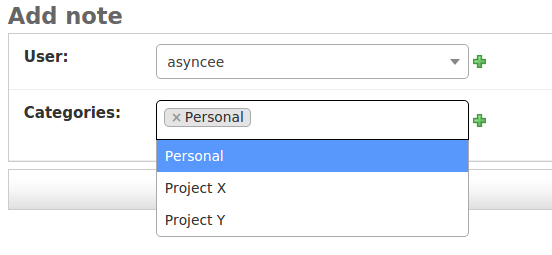

Here I Created Select2 with ManytoMany like this
models.py
form.py
views.py
HTML (base.html)
HTMl (index.html)
browser Output