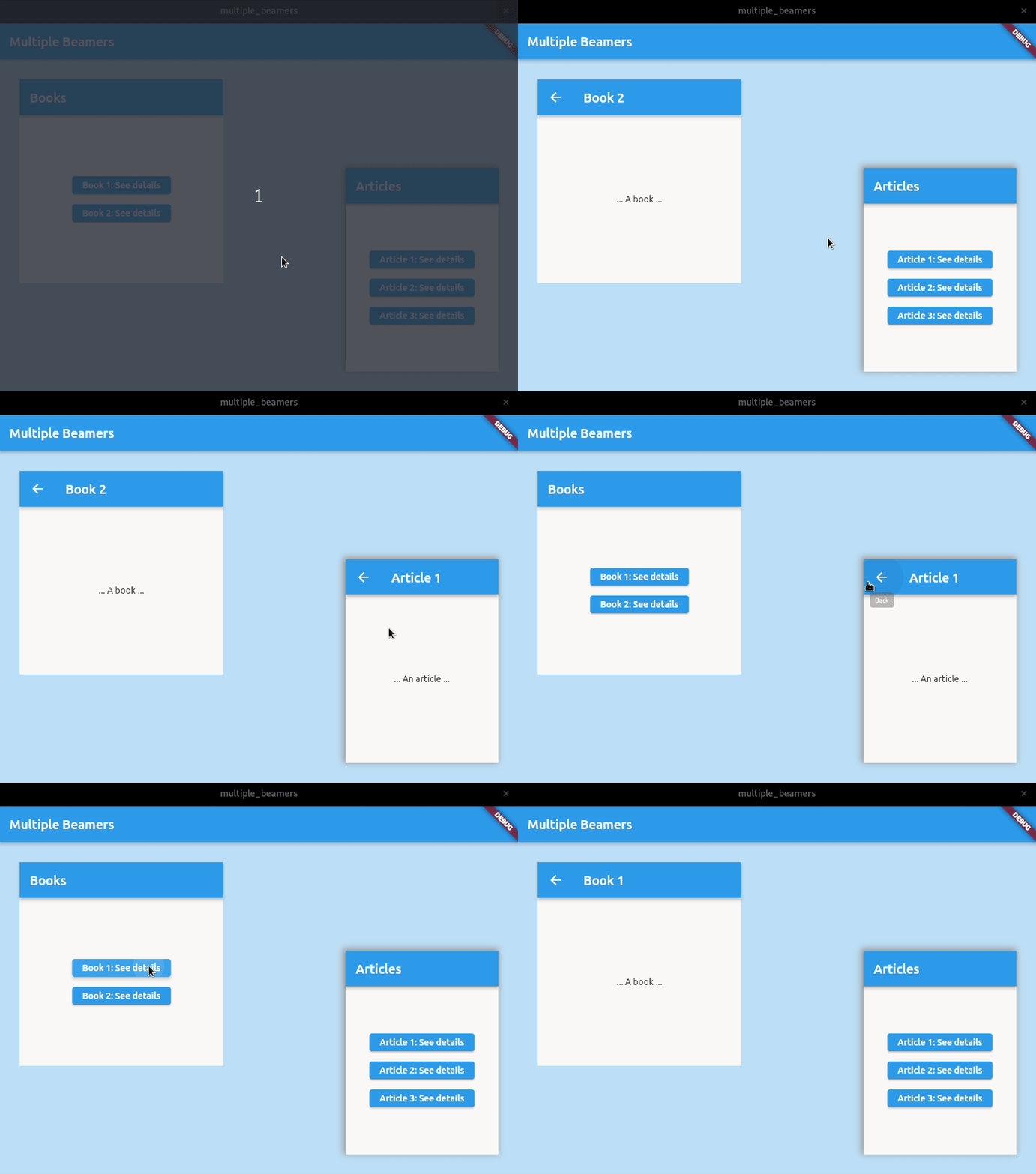
I want to add nested navigation inside a widget same as this gif: demo. I know this feature is available in packages like beamer and auto_route but I want to know if this is possible with go_router as well.
Go Router: How to implement nested navigation inside a widget
228 Views Asked by mechanic At
1
There are 1 best solutions below

Related Questions in FLUTTER
- Flutter + Dart: Editing name of a tab shows up a black screen
- The Binary Version Of its metadata is 1.8.0, expected Version is 1.6.0 build error
- Way to get CustomPainter to track face in Camera Flutter MLKit
- flutter Null check error: did not show file and line number
- Creating multiple instances of a class with different initializing values in Flutter
- I want to paste stickers into to my TextField and to show the stickers beside the emojis
- Flutter plugin development android src not opening after opening example
- Module not found when building flutter app for IOS
- How to make barrier area interactive in flutter modal bottom sheet
- Can an RPC result be included in a Supabase select function in Flutter for Data Modeling?
- Why do I need to wait to reaccess to Firestore database even though it has already done before?
- Flutter web app on Windows -how to support mouse drag for horizontal and vertical scrolling as well as using mouse wheel
- I wrote this time displaying FLUTTER app, How can I improve it?
- Appwrite and / or Spring Boot Backend
- Flutter two_dimensional_scrollables Web app Chrome - cannot get horizontal scroll to work?
Related Questions in NAVIGATION
- Why might react-router navigate(-1) go back two routes/pages?
- In @react-navigation's Tab.Navigator, I aim to lock the final screen while allowing the rest to scroll
- (ros melodic) Lidar odometry is not working well
- How to jump to a div using keyboard shortcuts?
- Flutter: How to use a BottomSheet in a BottomNavigationBar?
- Force security constraint managed 403 error when hitting restricted page with h:commandLink
- In Entity Framework Core, how to populate self-referencing navigation collection without additional Include (using only entities already tracked)?
- Blogger next previous navigations missing
- Cannot achieve live navigation using js,openstreetmap and leaflet
- Im using mapbox sdk navigation v2 and have a problem with the cycling view
- Assigning sensor information to image coordinates
- Blazor InteractiveServer navigate to external link whilst JWT added to the request headers?
- Navigate to a different page from the side bar drawer without using the bottom navigation bar using persistent flutter package
- WPF C# - Textblock inputs not saving on Navigation to new page?
- React Chrome vs Firefox Navigation is not defined
Related Questions in FLUTTER-GO-ROUTER
- Issue accessing queryParams with GoRouter in Flutter app after recent update
- Is a full app rebuild expected behaviour when changing url in browser when using go_router?
- Flutter - How do I correctly handle go_router, with redirects and context.pop()
- Updating go_router package to the latest version causes errors in Flutter app
- How to override riverpod providers for a page route that has been generated with GoRouter?
- Flutter: Changing the app theme without rebuilding it entirely
- When using the go_router package in Flutter, is it possible to use the "extra" parameter to pass some data and have it worked with deep-linking?
- Redirection to the home screen through OTP auto retrieval with Firebase
- GoRouter in Flutter not recognizing root path deep links without a trailing slash
- how to hide with button and hide after a duration a Material banner or snackbar
- Flutter Go Router Deep Linking Not Working As Expected
- How to trigger a pop callback function after the app is restored and the second route is popped?
- Keyboard close automatically and go back automatically when TextFormField is tapped in android
- Bloc state not updating with GoRouter and flutter_native_splash
- Flutter - Pushing into a StatefulShellRoute
Related Questions in AUTO-ROUTE
- Bad state: Unable to generate package graph, no /.dart_tool/flutter_gen/pubspec.yaml` found
- Flutter : My deeplink is always "/" in my deeplinkBuilder of AutoRoute library
- How to specify required parameters in AutoRoute? Error RouteArgs can not be null because the corresponding page has a required parameter
- Auto Route Issue in nested navigation back method
- Flutter: Adaptive list-detail layout in flutter with auto_route?
- how to handle deeplink with AutoRoute in flutter?
- Navigate to needed route using auto_route from notification
- How to persist the bottom Navigation bar while pushing multiple routes on one page while using auto_route in flutter?
- Reading Riverpod provider outside of build method - Flutter
- how to pass argument to nested route in auto_route?
- Deep Nested Navigation Flutter
- The AutoRoute does not change when the state changes
- Error when navigating with AppRoute Flutter
- Hero Animation not working in Children Routes of AutoRoute
- TextFormField not working properly with AutoRoute
Related Questions in FLUTTER-BEAMER
- Go Router: How to implement nested navigation inside a widget
- How to pass parameters in navigation using Beamer package in Flutter
- Flutter Strange behavior when pressing the Android back button on child Beamer
- Tabbed + TabLess navigation with Beamer: Multiple widgets used the same GlobalKey
- Flutter Beamer pass and retrieve data and getting NULL
- state.pathParameters is empty on Beamer Flutter
- Disable Android system back button using backButtonDispatcher (in Flutter)
- Use Beamer package with Get package
- Overriding builder method of BeamLocation
- Flutter beamer routing package causes rebuilding the previous screen when using beamBack method
- Using Beamer router with flutter, the url changes but the navigation doesn't happen
- Navigate from notification via beamer
- How to track screen names in firebase analytics using beamer?
- Flutter Beamer navigation back
- Fullscreen details overlay with beamer location
Trending Questions
- UIImageView Frame Doesn't Reflect Constraints
- Is it possible to use adb commands to click on a view by finding its ID?
- How to create a new web character symbol recognizable by html/javascript?
- Why isn't my CSS3 animation smooth in Google Chrome (but very smooth on other browsers)?
- Heap Gives Page Fault
- Connect ffmpeg to Visual Studio 2008
- Both Object- and ValueAnimator jumps when Duration is set above API LvL 24
- How to avoid default initialization of objects in std::vector?
- second argument of the command line arguments in a format other than char** argv or char* argv[]
- How to improve efficiency of algorithm which generates next lexicographic permutation?
- Navigating to the another actvity app getting crash in android
- How to read the particular message format in android and store in sqlite database?
- Resetting inventory status after order is cancelled
- Efficiently compute powers of X in SSE/AVX
- Insert into an external database using ajax and php : POST 500 (Internal Server Error)
Popular # Hahtags
Popular Questions
- How do I undo the most recent local commits in Git?
- How can I remove a specific item from an array in JavaScript?
- How do I delete a Git branch locally and remotely?
- Find all files containing a specific text (string) on Linux?
- How do I revert a Git repository to a previous commit?
- How do I create an HTML button that acts like a link?
- How do I check out a remote Git branch?
- How do I force "git pull" to overwrite local files?
- How do I list all files of a directory?
- How to check whether a string contains a substring in JavaScript?
- How do I redirect to another webpage?
- How can I iterate over rows in a Pandas DataFrame?
- How do I convert a String to an int in Java?
- Does Python have a string 'contains' substring method?
- How do I check if a string contains a specific word?
You can achieve this by using two
Router.withConfigwidgets from Flutter and passing two separateGoRouters to them, like so: