To develop a person follower robot, I am using ASUS Xtion and OpenNI. To obtain both RGB image and skeleton joints, I am using a skeleton tracker script (https://github.com/Chaos84/skeleton_tracker). Tracker publishes joints in "/tf" But the thing is that I cannot use those joint coordinates in my script. I don't know how to access them. How can I access and use them in my script to make the robot move according to those coordinates? Thanks.
How to access and use skeleton joint coordinates using OpenNI, ASUS Xtion, and ROS?
1.3k Views Asked by Gokay At
2
There are 2 best solutions below
0
 Derzu
On
Derzu
On
You can use another skeleton detection/tracker, the BodySkeletonTracker:
https://github.com/derzu/BodySkeletonTracker
Look how does it works:
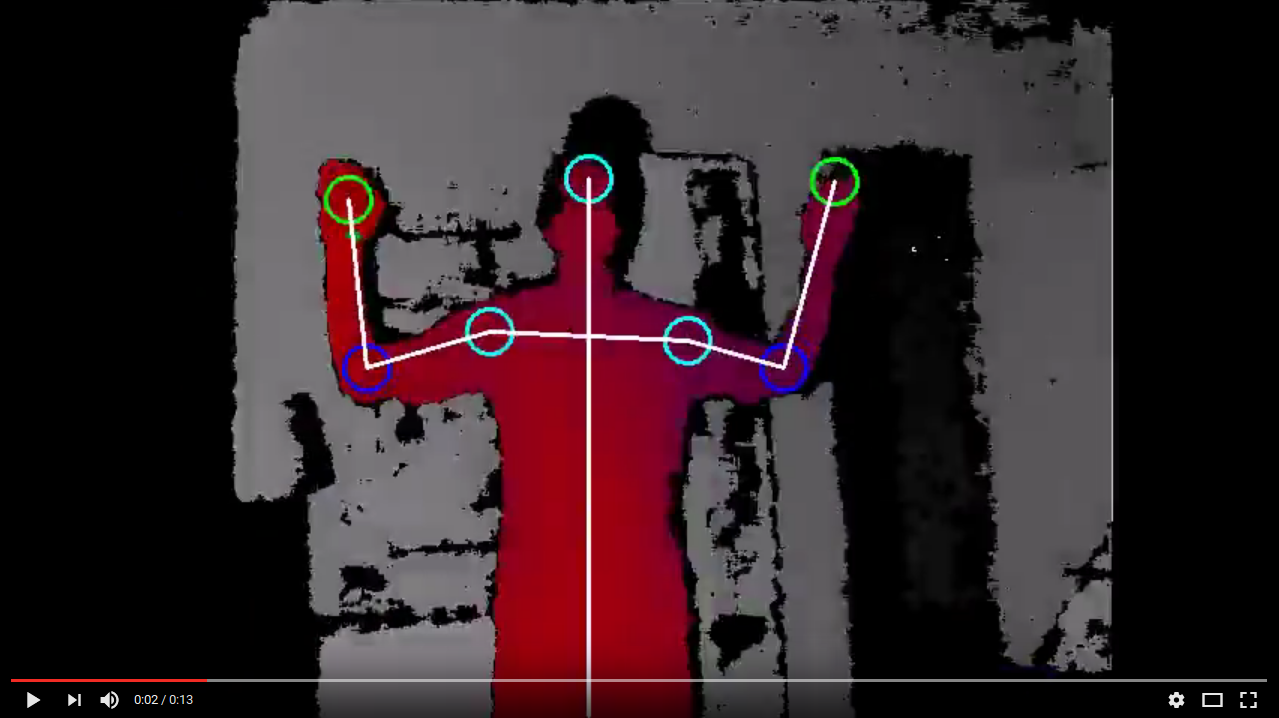
You can get the joints points getting an object of the class SkeletonPoints.
Related Questions in TRACKING
- px4 Drone does not follow Mavsdk control
- How to implement gaze tracking in drowsiness detection system
- Implementing Email Verification and Notification System in a Full-Stack Application with React Frontend and Node Backend
- Tracking domains - Network Instrument Points of Interest
- telegram bot online/offline status question
- Slow Rendering During VisionOS Image Tracking
- Flutter: Listen to location update while the is not in use even location permission is set to while using the app
- Problem with creating dataset for visual object tracker
- OpenCV Python tracking rectangle not moving with chosen person in video
- How can I prevent error 401 when making a DHL tracking request?
- How to create a Application that phone can use to send Radio Frequency Wave?
- GA4 tracking - Constantly clearing the ecommerce object creates noise
- Tracking user activity AWS backend - data used for AI/ML
- esp32 rssi based tracking - Consultation
- How do I implement cross-domain tracking between GA4 and DotDigital form tracking?
Related Questions in DETECTION
- AttributeError: 'Results' object has no attribute 'box'. can anyone explain this?
- How to calculate the two-dimensional centroid coordinates calculated from the human joints using Openpose
- Yolo makes one box for intersecting objects
- Flutter: How to detect platform-level edge swipes?
- Word-Addin heading detection
- Implementing Device-Specific Redirects in Angular Routing
- Plot probability of detection against number of surveys using 'unmarked' package
- The best methods to report object mesh problems?
- I have get error in jupyter noteboook Kernel Restarting The kernel for opencv_faces.ipynb appears to have died. It will restart automatically
- Barcode detection from an image on server side (particularly on node.js)
- Opencv movement detection without being trigger by random noise
- Java Garbage Cleaner detector
- Can a detection be written from Github audit events that finds commit/pushes done after review approvals in pull requests?
- How to split in R
- Get the Coordinate of Original Image
Related Questions in ROS
- Python cv2 imwrite() - RGB or BGR
- How do I stream data from TUM RGB-D to ORB-SLAM3 and analyse/record data from that
- px4 Drone does not follow Mavsdk control
- (ros melodic) Lidar odometry is not working well
- cmake and g++ cross compilation looking for library in host sysroot path instead of target sysroot
- How to Reset Quadcopters' Position and Velocity in Gazebo Using Python Script Without Relaunching the Launch File?
- Ros publisher and arduino subscriber
- Transform error while launching multiple turtlebots in ROS NOETIC
- How to convert local radar laser to global position?
- Unable to apply Camera Distortion on Gazebo Harmonic
- Extracting obstacle information from hectorslam map data
- KITTI dataset: ground truth labels (bird's eye view) match after an image generation?
- How to install pyyaml into `/usr/lib/python3/dist-packages`
- ros noetic installation problem on ubuntu
- How do I modify this DC motor encoder code to work with 4 DC motors?
Related Questions in OPENNI
- does openni support 2d camera
- OpenNI2 Undefined symbols for architecture arm64, missing required architecture arm64
- Using Orbbec Embedded S camera from ARM with OpenNI
- How to fix PCL All-In-One installing error, PATH too long installer unable to modify PATH
- Problem converting cv::Mat to pcl::pointcloud
- Record depth stream frame by frame with OpenNI2
- Generate skeleton from depthmap file
- How to convert an OpenNI VideoFrame to an OpenCV Mat data structure?
- OpenNI2 freezes when no camera is connected
- Record Orbbec Astra streams with python and OpenNI2
- OpenNI and OpenCV: cv2.imshow() crashes with error: (-215:Assertion failed) dst.data == (uchar*)dst_ptr in function 'cvShowImage'
- Controlling a virtual character's joints rotation with OpenNI + Kinect
- video capturing works in the example code, but doesn't in my own project
- Machine Learning: Question regarding processing of RGBD streams and involved components
- Dataset extraction for skeletal joints in openni2
Related Questions in ASUS-XTION
- the nvidia gpu not detected, even try to enable/disable igpu and primary display from BIOS
- How do I run these c++ and c files for NiHandTracker?
- asus xtion pro live working with visp_auto_tracker
- OpenNI: Device not found in sample code even though it is detected and working
- How can I check the firmware version of a primesense Xtion camera?
- VIDIOC_STREAMON error 28, No space left on device ,after i tried the common solution on the web
- OpenNI does not work with primeSense carmin 1.08x (Kinect) Although OpenNI2 is working with it
- Is reference dot pattern of Asus Xtion Pro Live same as Kinect
- Cannot capture video from ASUS Xtion using OpenCV on Jetson TK1
- Recording video with ASUS Xtion using python
- How to access and use skeleton joint coordinates using OpenNI, ASUS Xtion, and ROS?
- cannot get frame from openni device in python-opencv
- Accessing to a different computer's OpenNI camera device using python
- OpenNI human tracking from the ceiling with Asus Xtion Pro
- Is there a way to get the output of a bash script to "feed" into a variable in a python script that executes the action initially?
Trending Questions
- UIImageView Frame Doesn't Reflect Constraints
- Is it possible to use adb commands to click on a view by finding its ID?
- How to create a new web character symbol recognizable by html/javascript?
- Why isn't my CSS3 animation smooth in Google Chrome (but very smooth on other browsers)?
- Heap Gives Page Fault
- Connect ffmpeg to Visual Studio 2008
- Both Object- and ValueAnimator jumps when Duration is set above API LvL 24
- How to avoid default initialization of objects in std::vector?
- second argument of the command line arguments in a format other than char** argv or char* argv[]
- How to improve efficiency of algorithm which generates next lexicographic permutation?
- Navigating to the another actvity app getting crash in android
- How to read the particular message format in android and store in sqlite database?
- Resetting inventory status after order is cancelled
- Efficiently compute powers of X in SSE/AVX
- Insert into an external database using ajax and php : POST 500 (Internal Server Error)
Popular # Hahtags
Popular Questions
- How do I undo the most recent local commits in Git?
- How can I remove a specific item from an array in JavaScript?
- How do I delete a Git branch locally and remotely?
- Find all files containing a specific text (string) on Linux?
- How do I revert a Git repository to a previous commit?
- How do I create an HTML button that acts like a link?
- How do I check out a remote Git branch?
- How do I force "git pull" to overwrite local files?
- How do I list all files of a directory?
- How to check whether a string contains a substring in JavaScript?
- How do I redirect to another webpage?
- How can I iterate over rows in a Pandas DataFrame?
- How do I convert a String to an int in Java?
- Does Python have a string 'contains' substring method?
- How do I check if a string contains a specific word?
To get joint coordinates and angles from a /tf topic, you need to right a tf listener which is explained in this link.
Also you can look at one of my ROS packages where I wrote tf listener using OpenNI and ASUS Xtion. Here is the link.