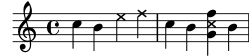
I've taken this example here from the Lily Pond docs. This is expected output. This is my Python script.
import abjad
notes = r"c''4 b \xNote { e f } c b < g \xNote c f > b"
voice_1 = abjad.Voice(notes)
staff = abjad.Staff([voice_1])
abjad.show(staff)
Console is throwing "Exception: LilyPondParser can not emulate music function: \xNote.". Any idea why this is happening? Or how to do this correctly?
The attached image shows expected output. Instead I'm getting an "LilyPondParser can not emulate music function: \xNote" error.

I don't know anything about abjad, but the correct syntax is \xNotesOn and \xNotesOff, not just \xNotes.