My app allows saving images to the native Files app. I do it like this:
func save(imageData: Data,
          toFolder folderName: String,
          withFileName fileName: String) {
    DispatchQueue.global().async {
        let manager = FileManager.default
        let documentFolder = manager.urls(for: .documentDirectory, in: .userDomainMask).last
        let folder = documentFolder?.appendingPathComponent(folderName)
        let file = folder?.appendingPathComponent(fileName)

        do {
            try manager.createDirectory(at: folder!, withIntermediateDirectories: true, attributes: [:])
            if let file = file {
                try imageData.write(to: file)
            }
        } catch {
            print(error.localizedDescription)
        }
    }
}
But when I tap on the image inside the Files app, I am navigated to my app, instead of the image just being open in the Files app.
How can this be changed?
Example of the same unwanted behavior that is happening on the Snapseed app (app by Google) https://media.giphy.com/media/Odnyy9J52HJjhmr0Fl/giphy.gif

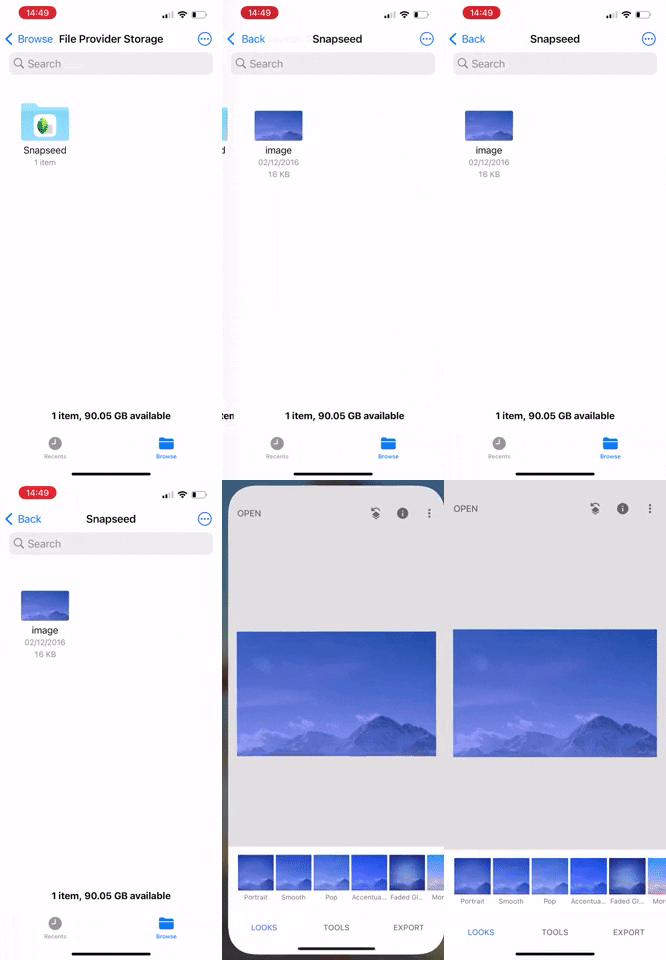
After doing some research, I don't think this is unwanted behavior but more like behavior that
Snapseedhas subscribed to, as this behavior does not happen automatically.However, there is some bug (I think) that does not let you unsubscribe from this behavior easily.
The place we need to look at is using
LSSupportsOpeningDocumentsInPlaceandCFBundleDocumentTypes, more on that here and here:Here I created a small example to save an image from the app main bundle to the documents directory when the user taps a button using your code:
Absolutely no difference to your code
If you add the following to your
info.plistThis supports exposing your documents directory in the files app and after this everything works as normal:
However, if you want your app to be part of a group that opens certain file formats, you modify your info.plist to add the
CFBundleDocumentTypesto suggest that your app is able to open specific files, like images in our case.To do that, we add the following to
info.plistThis would allow your app to be listed when some wants to share or open an image and by adding this, then we get the behavior shown in your gif which opens the app instead of the preview in the files app
Unfortunately, it seems once this behavior is assigned to your app, even if you remove the above above key from info.plist, this behavior persists.
The only way I could restore the original behavior was by using a fresh bundle identifier and only using these two keys in the
info.plistin order to expose your documents directory to the Files appI believe this is some sort of bug as there should be a simple way to unsubscribe from this behavior.
Hope this helps even though it does not fully solve your problem