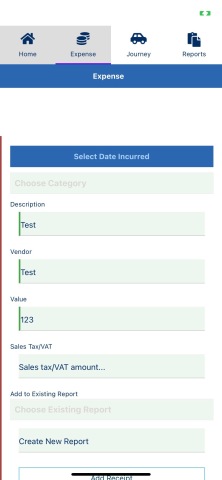
I am getting an odd issue with a form layout on iPhone. I am using an iPhone 11 running iOS 16.6.
The form elements are inside a StackLayout which is inside a GridLayout which is inside a ScrollView.
There are 3 TextFields one after the other and when you enter text into the 3rd one and hit Done and the keyboard gets hidden, a space appears above the form and pushes the submit button off screen and it can't be reached by scrolling.
I have tried replacing the GridLayout with a FlexLayout but it didn't have any effect. I also tried removing the StackLayout wrapper. Has anyone encountered this issue? I'm stumped.
Here is the code and a screenshot of the empty form and another screenshot taken after entering text in the 3rd TextField.
The issue does not happen on Android. Thanks.
<ActionBar class="action-bar" flat="true">
  <NavigationButton
    text="Home"
    (tap)="navigateToTab(0)"
    android.systemIcon="ic_menu_back"
    ios.position="left"
  ></NavigationButton>
  <Label class="action-bar-title" text="Expense"></Label>
</ActionBar>

<ScrollView id="myScroller" #scrollView (swipe)="onSwipe($event)">
  <GridLayout>
    <StackLayout
      topMargin="100"
      class="form"
      [formGroup]="expenseForm"
      (loaded)="onExpenseLoaded()"
    >
      <StackLayout>
        <Label
          *ngIf="selectedDate"
          [text]="'Date Incurred: ' + selectedDate"
          class="h3 m-15 datepicker"
          textWrap="true"
        ></Label>
        <Button
          class="btn btn-primary btn-datepicker"
          text="Select Date Incurred"
          (tap)="getDate()"
        ></Button>
      </StackLayout>

      <StackLayout>
        <GridLayout rows="auto, auto, *" columns="auto, *">
          <DropDown
            id="cat_options"
            #dd
            [isEnabled]="!processing"
            class="dropdownClass"
            [items]="catid"
            [hint]="cat_hint"
            (selectedIndexChanged)="onchangecatid($event)"
            (opened)="onopen()"
            (closed)="onclose()"
          ></DropDown>
        </GridLayout>
      </StackLayout>

      <StackLayout>
        <GridLayout rows="auto, auto, *" columns="auto, *">
          <DropDown
            id="subcat_options"
            #dd
            [isEnabled]="!processing"
            class="dropdownClass"
            [items]="subcatid"
            [hint]="subcat_hint"
            (selectedIndexChanged)="onchangesubcatid($event)"
            (opened)="onopen()"
            (closed)="onclose()"
            [visibility]="isSubcats ? 'visible' : 'collapse'"
          >
          </DropDown>
        </GridLayout>
      </StackLayout>

      <StackLayout>
        <GridLayout rows="auto, auto, *" columns="auto, *">
          <DropDown
            id="policy_options"
            #dd
            [isEnabled]="!processing"
            class="dropdownClass"
            [items]="policy_id"
            [hint]="policy_hint"
            (selectedIndexChanged)="onchangepolicy_id($event)"
            (opened)="onopen()"
            (closed)="onclose()"
            [visibility]="isPolicies ? 'visible' : 'collapse'"
          >
          </DropDown>
        </GridLayout>
      </StackLayout>
      <StackLayout>
        <Label text="Description"></Label>
        <TextField
          formControlName="journeyReason"
          [isEnabled]="!processing"
          hint="Enter description..."
          required
        >
        </TextField>

        <Label text="Vendor"></Label>
        <TextField
          formControlName="claimVendor"
          [isEnabled]="!processing"
          text="{{ this.expense.claim_vendor }}"
          hint="Enter vendor..."
          required
        >
        </TextField>

        <Label text="Value"></Label>
        <TextField
          formControlName="claimAmount"
          [isEnabled]="!processing"
          keyboardType="number"
          (blur)="onBlurClaimAmount()"
          hint="Enter claim amount..."
          required
          number
        >
        </TextField>

        <Label text="Sales Tax/VAT"></Label>
        <TextField
          formControlName="salesTax"
          [isEnabled]="!processing"
          keyboardType="number"
          hint="Sales tax/VAT amount..."
          number
        >
        </TextField>
      </StackLayout>

      <StackLayout>
        <Label text="Add to Existing Report"></Label>
        <GridLayout rows="auto, auto, *" columns="auto, *">
          <DropDown
            id="report_options"
            #dd
            [isEnabled]="!processing"
            class="dropdownClass"
            [items]="reportid"
            [hint]="report_hint"
            (selectedIndexChanged)="onchangereportid($event)"
            (opened)="onopen()"
            (closed)="onclose()"
            row="0"
            colSpan="2"
          >
          </DropDown>
        </GridLayout>
      </StackLayout>

      <StackLayout>
        <Label
          text="Create New Report"
          *ngIf="this.expenseForm.value.addToNewReport"
        ></Label>
        <TextField
          [isEnabled]="!processing"
          formControlName="addToNewReport"
          hint="Create New Report"
        >
        </TextField>
      </StackLayout>

      <StackLayout *ngIf="imgSelected || ocrData">
        <Image
          *ngIf="imgSelected"
          [src]="imgSelected"
          [width]="previewSize"
          [height]="previewSize"
          stretch="aspectFit"
        >
        </Image>
        <Image
          *ngIf="ocrData"
          src="data:image/jpeg;base64,{{ ocrData }}"
          [width]="previewSize"
          [height]="previewSize"
          stretch="aspectFit"
        >
        </Image>
        <TextField formControlName="receiptData" visibility="collapsed">
        </TextField>
      </StackLayout>

      <StackLayout>
        <Button
          text="{{ this.buttonText }}"
          (tap)="onSelectImage($event)"
          class="-outline"
        >
        </Button>

        <Button
          text="Save Expense"
          class="btn btn-primary"
          (tap)="onCreate()"
          [isEnabled]="!processing"
        >
        </Button>

        <Label
          text="^Top"
          horizontalAlignment="right"
          (tap)="goToTop($event)"
        ></Label>
      </StackLayout>
    </StackLayout>
  </GridLayout>
</ScrollView>
Before
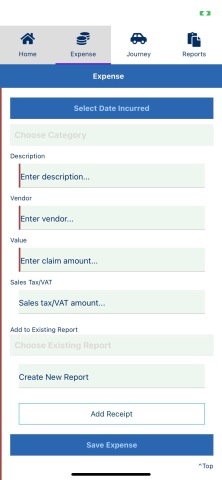
After